Before you start
The price you already have on each product stays where it is. VahaPOS does not create variants or duplicate products. It only changes how that price is read.
Add a collection to sell by weight
Step 1: Open VahaPOS from your Shopify admin.
The dashboard is the home screen of the app. It lists your Sell by Weight collections, your devices and the QR code generator.
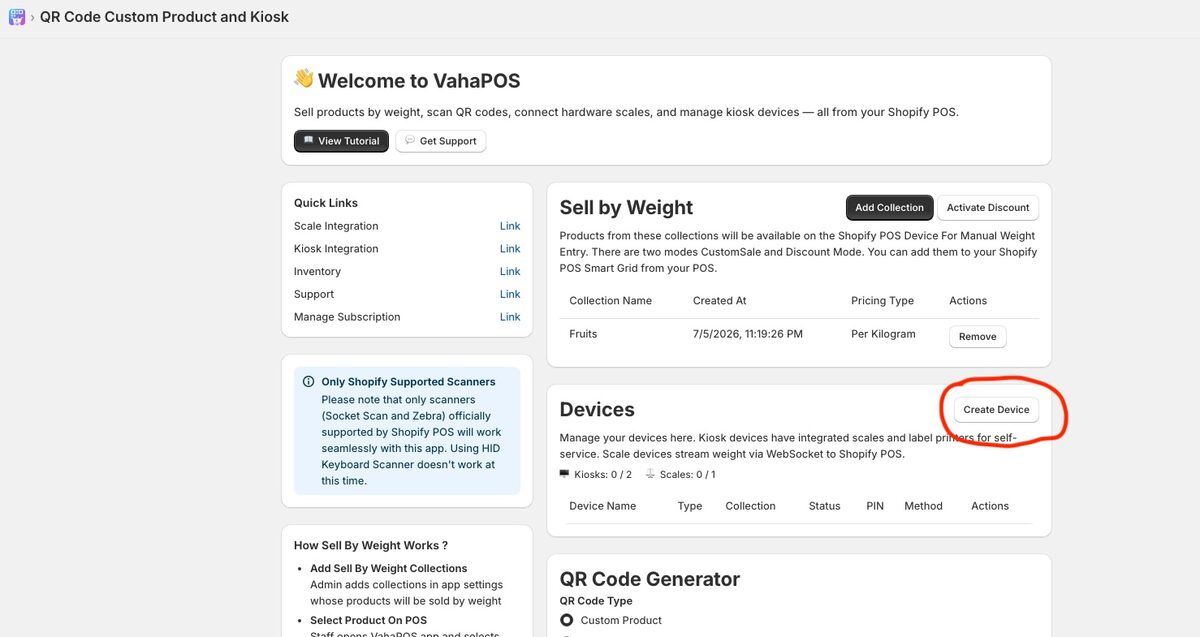
Step 2: In the Sell by Weight section, choose Add Collection.
Step 3: Pick a Shopify collection from the list.
Every product in it becomes available to VahaPOS. Products outside your chosen collections are ignored everywhere in the app.
Step 4: Choose the pricing type for that collection.
Per gram, per 100 grams, per kilogram, per ounce, per pound and so on.
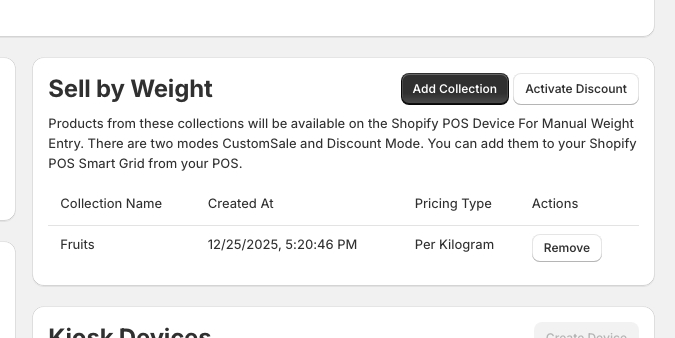
Step 5: Save. The collection now appears on your dashboard with its created date and pricing type.
Pricing types: per kg, per lb, per 100 g and more
The pricing type is the unit your product price is quoted in. Pick the one your price tags already use so staff and customers see familiar numbers.
| Pricing type | Product price means | Typical use |
|---|---|---|
| Per kilogram | Price for 1 kg | Produce, butcher, bulk grains in metric stores |
| Per 100 grams | Price for 100 g | Deli counters, cheese, olives, sweets |
| Per gram | Price for 1 g | Spices, tea, high-value goods |
| Per pound | Price for 1 lb | Produce and meat in the US and Canada |
| Per ounce | Price for 1 oz | Candy, nuts and small-quantity goods in the US |
Prices are per unit of weight
Once a collection has a pricing type, the price on each product is read as a rate. A product priced at 12.00 in a per kilogram collection means 12.00 per kilogram, and a 250 g serving is charged at 3.00.
12.00 per kg
The product price in Shopify
0.250 kg
Typed in, or read from a scale
3.00 in the cart
Weight and rate shown on the receipt
What the customer sees
- The cart line shows the product, the weight and the rate, for example “Organic Lemons (0.32 kg @ 2.99 / kg)”.
- The printed receipt carries the same detail, so there is nothing to explain at the till.
- Taxes, discounts and reports work as normal because the sale is a regular Shopify line item.
Using more than one collection
You can add several collections with different pricing types: a deli counter priced per 100 g and a butcher priced per kilogram, for example. A product only needs to be in one of them.
Kiosks are tied to a single collection, so a produce kiosk shows only produce. Manual entry and connected scales serve every collection you have added.
What next? Choose how weight is captured
How you capture weight decides the rest of your setup. Typing it in needs no hardware at all and is the quickest way to start. A connected scale reads the weight for staff, and a kiosk lets customers weigh and label their own goods. Read whichever matches your store.
Manual entry
Connected scale
Self-service kiosk